How to register Mobile number in your vehicle Registration Cretificate no.(RC) ?

अपने वाहन के रजिस्ट्रेशन में अपना मोबाइल न० कैसे फीड करे ?

यदि आपके वाहन के रजिस्ट्रेशन न० पर आपका मोबाइल न० फीड नहीं है या आपका रजिस्टर किया हुआ मोबाइल न० खो गया या बंद हो गया है तो आप अपने वाहन के  रजिस्ट्रेशन न० पर अपना नया मोबाइल न० स्वय भी ऑनलाइन फीड/अपडेट कर सकते है मोबाइल न० रजिस्टर होने पर परिवहन विभाग से आने बाली सूचनाये आपके मोबाइल पर पहुच जाती  है इसके साथ ही ई चालान होने पर इसकी  सूचना आपके मोबाइल पर ही भेजी जाती है 

मोबाइल न० अपडेट/ फीड करने का प्रोसेस 

सबसे पहले आप किसी भी ब्राउज़र में परिवहन विभाग की ऑफिसियल वेबसाइट https://parivahan.gov.in/parivahan/ ओपन करे | परिवहन विभाग की वेबसाइट ओपन होने के बाद आप ONLINE SERVICES ड्रापडाउन मीनू में से Vehicle Related Services को सलेक्ट करें 

उसके बाद एक नया पेज खुलेगा जिसमे आपकी गाड़ी का रजिस्ट्रेशन जिस राज्य का है उसे सेलेक्ट करें यदि आपकी गाड़ी का रजिस्ट्रेशन दिल्ली या सिक्किम का है तो आप Delhi & Sikkim State सेलेक्ट करे और यदि किसी अन्य प्रदेश का है तो Other State सेलेक्ट करे |

दिल्ली या सिक्किम स्टेट के गाड़ी रजिस्ट्रेशन पर मोबाइल अपडेट करने के लिए

1- सबसे पहले Delhi & Sikkim State सेलेक्ट करें परिवहन विभाग की ऑफिसियल वेबसाईट पर जाये  | यदि आप पहले से पंजीकृत है तो सीधे लॉग इन बटन पर क्लिक करके लॉग इन करें अथवा अपना खाता बनाने के लिए पंजीकरण (Register) बटन पर क्लिक करें यूजर रजिस्ट्रेशन फॉर्म में अपना पूरा नाम ,ईमेल id,  मोबाइल न० तथा राज्य चुनकर , सुरक्षा कोड भरकर रजिस्टर बटन पर क्लिक करके अपना पंजीकरण करे |

2- रजिस्टर होने के बाद लॉग इन बटन पर क्लिक करके लॉग इन करना होगा | उसके लिए आपको अपनी ईमेल id ओपन करके ईमेल वेरिफिकेशन पर क्लिक करके OTP ENTER करके अपना नया लॉग इन पासवर्ड बनाना होगा |

3- अब आप यूजर id में अपनी ईमेल id और अपना बनाया हुआ पासवर्ड डालकर लॉग इन कर ले |लॉग इन होने के बाद OTHER SERVICES में जाकर UPDATE VEHICLE OWNER'S MOBILE NO. पर क्लिक करें |

4- Update Vehicle Owner's Mobile No. पर क्लिक करने पर इस तरह से पेज खुलेगा

इसमें आप  अपनी गाड़ी का रजिस्ट्रेशन न० , चेसिस न० ,  इंजन न० तथा अपना मोबाइल न० डालकर Generate OTP पर क्लिक करे

5- मोबाइल पर प्राप्त OTP डालकर Update पर क्लिक करें | जैसे Update पर क्लिक करेंगे आपका मोबाइल न० आपकी गाड़ी के रजिस्ट्रेशन में फीड हो जायेगा |

Uttar Pradesh, Jharkhand, Meghalaya, Rajasthan, West Bengal, Assam, Tripura, Himachal Pradesh, Puducherry, Bihar, Haryana, Tamil Nadu, Odisha, Karnataka, Chhattisgarh, Kerala, Uttarakhand के वाहन के रजिस्ट्रेशन पर मोबाइल न० अपडेट/ फीड करने का तरीका

1- सबसे पहले परिवहन विभाग की ऑफिसियल वेबसाइट https://parivahan.gov.in/parivahan/ ओपन करे | परिवहन विभाग की वेबसाइट ओपन होने के बाद आप ONLINE SERVICES ड्रापडाउन मीनू में से Vehicle Related Services को सलेक्ट करें |उसके बाद एक नया पेज खुलेगा जिसमे आपकी गाड़ी का रजिस्ट्रेशन जिस राज्य का है उसे सेलेक्ट करें|  गाड़ी का रजिस्ट्रेशन दिल्ली या सिक्किम का है तो आप "Delhi & Sikkim State" सेलेक्ट करे और यदि किसी अन्य प्रदेश का है तो "Other State" सेलेक्ट करे  |
2- Other State सेलेक्ट करने पर आपके सामने Vahan Citizen Services की होम पेज ओपन होगा | इसमें आपको Update Mobile Number बटन पर क्लिक करना है

3- Update Mobile Number बटन पर क्लिक करने के बाद एक नया पेज कई राज्यों के नाम दिखाई देंगे | यदि इसमें आपके राज्य का नाम दिख रहा है तो Yes बटन पर क्लिक करें |
4- उसके बाद एक और पेज ओपन होगा इसमें आपको अपनी गाड़ी का रजिस्ट्रेशन न०, चेसिस न० , और इंजन न० भरकर Show Details बटन पर क्लिक करना है


HOW TO CORRECT AADHAAR IN PM KISAN SAMMAN NIDHI YOJNA प्रधान मंत्री किसान सम्मान निधि योजना में अपना आधार नंबर कैसे सुधारे ?

यदि आपका भी प्रधान मंत्री किसान सम्मान निधि योजना का स्टेटस आधार न० से नहीं खुल रहा है लेकिन बैंक अकाउंट से खुल रहा है तो इसका मतलब है कि प्रधान मंत्री किसान सम्मान निधि योजना में आपका आधार न० गलत फीड है जिस कारण स्टेटस में आधार न० Not VERIFIED लिखकर आरहा होगा | जब तक आपके pm किसान के स्टेटस में Aadhaar Number Verified नही होगा तब तक आपकी आगे की आने बाली किस्ते नहीं आयेगी | आप स्वयं भी अपना आधार न० सही कर सकते है लेकिन सही आधार न० फीड  करने के लिए आपको PM Kisan में फीड  गलत आधार न० पता होना चाहिए जिससे की आप अपने Pm Kisan पोर्टल  पर उपलब्ध Edit Aadhaar Details सेक्शन में  लॉग इन कर सके |

 PM किसान सम्मान निधि योजना में फीड अपना गलत आधार न० कैसे पता करे ?

PM किसान सम्मान निधि योजना में फीड अपना गलत आधार न० पता करने के लिए सबसे पहले अपना PM किसान का स्टेटस अपने बैंक अकाउंट न० से निकाले और उसमे दिखाई दे रहे अंतिम चार अंको को अपने आधार के अंतिम चार अंको से मिलान करके देखे ? यदि उनमे एक आदि अंक गलत हो तो आपको क्या करना है अपने pm किसान के स्टेटस में दिखाई दे रहे  चार अंको को अपने आधार के शुरू के आठ अंको के साथ मिलाकर एक 12 अंको की संख्या अलग नोट कर लेनी है अब उसी संख्या से अपना PM किसान स्टेटस चेक करके देखे यदि उस संख्या से आपका स्टेटस दिखाई दे जाता है तो यह संख्या ही आपका गलत आधार है जैसे


समझने के लिए ऊपर दिखाई गयी फोटो में pm किसान स्टेटस में आधार के अंतिम 4 अंक और आधार के अंतिम 4 अंक अलग अलग है क्योकि स्टेटस में लास्ट के अंक 2010 है जबकि आधार में अंतिम अंक 2222 है तो हमें क्या करना है आधार के शुरू के 8 अंक 0000 1111  तथा स्टेटस के लास्ट के 4 अंक 2010 दोनों को मिला कर एक नया न० बनाना है जैसे 0000 1111 2010 | इस प्रकार हम अपना गलत आधार न० प्राप्त कर सकते है इस न० से ही PM किसान वेबसाइट पर Farmer Corner में में उपलब्ध Edit Aadhaar Failure Record में login करके हम PM किसान सम्मान निधि में फीड गलत आधार न० की जगह अपना सही आधार न० फीड  कर सकते है 

और यदि किसान सम्मान निधि स्टेटस में दिखाई दे रहे आधार के अंतिम 4 अंक और आपके आधार के अंतिम 4 अंक समान है तो PM किसान में आपका आधार शुरू में कही पर गलत है जो छिपा(Hide) होने के कारण दिखाई नहीं देता है इस प्रकार की समस्या में आपको अपने जिले के उप कृषि निदेशक कार्यालय या अपने ब्लाक स्तर के कृषि बीज गोदाम  पर मौजूद अपने क्षेत्रीय कर्मचारी से संपर्क करके अपना गलत आधार न० प्राप्त कर सकते है या उनके पास ही अपने कागजात जैसे आधार कार्ड ,बैंक पासबुक , आदि जमा करके सही करने का अनुरोध कर सकते है |
पूरा प्रोसेस स्टेप by स्टेप समझने के लिए इस विडियो को देखें


पीएम किसान योजना से संबंधित जानकारी

पीएम किसान योजना से संबंधित जानकारी                                

1-  जिन किसान भाइयों का आधार से स्टेटस चेक करने पर राज्य सरकार द्वारा रोक लगी  दिखाई देता है (यानि Installment Stopped by State दिखाई दे रहा है ) उन सभी किसान भाइयों का भुगतान आधार के माध्यम से किया जा रहा है  जिस बैंक में किसान का आधार मैप होगा उसी खाते में पीएम किसान की किस्त आयेंगी | इसके लिए किसान भाई अपने अपने बैंक खाते में आधार लिंक करवा ले और साथ ही बैंक में आधार से kyc भी करा ले जिससे PM किसान की किस्ते आसानी से आपके आधार लिंक्ड बैंक खाते में पहुच जाये |
नोट - कृपया ध्यान कुछ किसान भाइयो ने पेटीएम(Paytm) kyc करने वाले लोगो से Paytm Kyc करवाई है तो  उन किसान भाइयो की आधार के माध्यम से  आने वाली PM किसान की किस्त Paytm Payment Bank खाते में पहुच सकती है इसलिए यदि किसी ने Paytm kyc कराई है और उन्हें इसकी  जानकारी नहीं है वे सभी लोग यह चेक कर ले कि  उनका आधार किस बैंक में मैप किया हुआ है  ऐसे सभी किसान भाई  नीचे दी  गयी लिंक से अपना  स्टेटस चेक कर सकते है 
2- जिन किसान भाइयों के पीएम किसान का स्टेटस चेक करने पर बैंक खाते की जगह पर आधार संख्या आ रही है उन सभी किसान भाइयों का भुगतान आधार के माध्यम से किया जा रहा है  जिस बैंक में किसान का आधार मैप होगा उसी खाते में पीएम किसान की किस्त आयेंगी                                               
3-     जिन किसान भाइयों का आधार वेरीफाई नहीं है  उन किसान भाई के पंजीकरण  में दो प्रकार की समस्या हो सकती है.         

(i) -पीएम किसान साइड पर अगर आधार नंबर डालने पर अगर आपका डाटा दिख जाता है तब आपका आधार और पंजीकरण में  नाम अलग अलग है इसको सही करने के लिए आप किसी भी कामन सर्विस सेंटर पर संपर्क कर  सकते है.                                                    

(ii)– पीएम किसान साइड पर बैंक खाता डालने पर डाटा दिख जाता  है लेकिन आधार से डाटा नहीं दिखता इसको सही करने के लिए  किसान भाई कृषि विभाग के राजकीय कृषि बीज भंडार पर या कृषि विभाग के क्षेत्रीय कर्मचारी से संपर्क कर अपना आधार बेरीफाई करा सकते है।            
   
4- किसान द्वारा स्वय या CSC के द्वारा ऑनलाइन किये गए PM किसान सम्मान निधि योजना के आवेदन की स्थिति चेक करने पर यदि रिजेक्टेड by स्टेट / डिस्ट्रिक्ट (Rejected By State/District) लिखकर  आ रहा है तो उन किसानो का पंजीकरण पहले से ही किया हुआ है लेकिन उनका पंजीकरण अपात्र बाली सूची में है | पंजीकरण अपात्र होने के कारण उनकी एक भी क़िस्त नहीं आयी है| किसान भाई  नीचे दी गयी लिंक पर क्लिक करके अपना खाता न० या मोबाइल न० , या अपना नाम डालकर अपना किसान पंजीकरण सर्च कर सकते है

अपना किसान पंजीकरण न० देखे


Pm kisan 5th instalment Check Payment with "Track Status All In one " Android App

इस App की सहायता से आप प्रधान मंत्री किसान सम्मान निधि के नए आवेदन की स्थिति चेक कर सकते है और Pm Kisan की Payment का Status प्राप्त कर सकते हो इसके साथ ही , Pan card Status, Aadhaar Status, Aadhaar Update Status, Aadhaar Bank Linking Status,Find Lost Aadhaar, Aadhaar linked Mobile No,Speed Post Tracking, Passport Status, PNR Status,Bharat and Indane Gas Booking, Pacl Refund Status, Kisan Panjikaran, Ration Card, Live News Channel etc. की जानकारी एक ही एप्लीकेशन में
नीचे दी गयी लिंक से डाउनलोड करें   

How to get Aadhaar Number Via EID without registered Mobile No.

If you have a Aadhaar Enrollment slip and do not have your registered mobile number or your mobile number is not registered in aadhaar, then you cannot download your Aadhaar, But you can get your Aadhaar number. Yes, you can get your Aadhaar number without registered mobile number. To know how to get Aadhaar number you have to adopt the following method

Step 1. Firstly, you have to call 1947 from any mobile number.After connecting the call, select your language by pressing the button.

Step 2- After Selecting language you have to press 1 ( Because you have already have Aadhaar  enrollment slip ) And after press 1 again ( for getting The Status of your Aadhaar Enrollment slip) 
 
Step 3- You will then be asked to enter your 16 digit Aadhaar Enrollment number (Please enter your 16 digit Enrollment  number from Aadhaar Enrollment slip and follow the voice ) If you have entered the correct Enrollment  number,you will get the status of your Aadhaar enrollment after pressing 1 baton. If your Aadhaar number has been Generated, you will be asked to press 1 to know your Aadhaar number.( press baton 1)
 
Step 4- After pressing 1 you will be asked to enter your Area pin Code.
(please enter your area pin code( post office pin code) printed on 
Enrollment Slip and follow voice( If you have entered  correct Area 
pin code then you will hear your Aadhaar Number ) Please Notedown
 you Aadhaar Number 


How to Download E Aadhaar by Name and Email id?

Now you can Download your E-Aadhaar by Name and Email id . If you have already registered your email id in Aadhaar  then you can download your E Aadhaar by name and email id. To download E Aadhaar card follow these steps:-
  • First you have to find  EID of your Aadhaar. To Find EID Click Here
  • New Tab Open and shown as↴ 

  • Enter your name , Email id and security code.
  • Click on Get OTP. 
  • Now enter OTP You Received on Email id and Click on “Verify OTP
  • After it you will get a SMS in Email id with your Enrollment ID. 
 After getting Enrolment id (EID) Follewthese Steps
  • Go To UIDAI website At https://eaadhaar.uidai.gov.in/
  • If you have Enrolment Number than you click 'Enrolment id' Radio Button.
  • Now enter your Enrolment id  with Date & time.
  • In Next Box Enter your Name shown on acknowledge Slip.
  • Enter Security Code (Image Code) And your aria pin code .
  • Enter Mobile No. to receive O.T.P.
  • After Filling all information Click on Get One Time Password .
  • Enter O.T.P. Received on Mobile And click Validate & Download  
  • Now your E Aadhaar downloaded into your computer . Open it in Adobe Reader.  
  •  

1.1 Definitions and Acronyms

1.1 Definitions and Acronyms

1. AADHAAR – Brand name associated with UIDAI.
2. Authority – Unique Identification Authority of India (UIDAI).
3. Biometric Data – refers to the facial image, iris scan and fingerprints collected by the
Enrolment Agency from the enrolees based on the standards prescribed by the UIDAI and
by following the process laid down for the purpose. The data collected is passed on to the
UIDAI as per the process prescribed.
4. CIDR: Central Identities Data Repository
5. CSC – Common Service Centres operating as franchisees of Service Center Agency
(SCA) within a State, as part of the CSC Scheme of the National E-Governance Plan of
India.
6. DDSVP – Demographic Data Standards and Verification Procedure.
7. De-duplication – the process of using the Demographic and Biometric data collected
from an enrolee to check against data so as to avoid duplicate enrolments.
8. Demographic Data – refers to the personal information collected or verified by the
Enrolling Agency based on the data fields prescribed by the UIDAI and by following the
process laid down for the purpose. The data collected is passed on to the UIDAI as per the
process prescribed.
9. DIT – Department of Information Technology.
10. Enhancement / Upgrade – refers to request for upgrade of Technical & Financial status
of existing empanelled Agencies based on their technical and financial capacities.
11. Enrolling Agency/ Enrolment Agency – The Agency appointed by the Registrar for
collection of the Demographic and Biometric data in the area assigned by the Registrar.
12. Enrolment – refers to the exercise of collection of demographic data after verification,
collection of biometrics, and the allocation of the UID number after de-duplication.
13. Successful Enrolment – Enrolment that results in Aadhaar number generation
14. Enrolment Centre – refers to the premises located in the area where the enrolment is
being carried out. One Enrolment Centre can host multiple Enrolment Stations.
15. Enrolment Station – refers to an individual enrolment booth/enclosure inside the
Enrolment Centre. The capture of Demographic and Biometric data is done in this
Station.
16. KYC – Know Your Customer.
17. KYR – Know Your Resident.
18. KYR+ - details for Verification beyond identification (KYR)
19. Financial Year – From April1st to March 31st
20. Manual – Resident Enrolment Process Document
21. MoU – Memorandum of Understanding.
22. NGO – Non Government Organization.
23. NPR – National Population register.
24. Operator – the person employed by the Enrolment Agency and engaged in the capture of
Demographic and Biometric Data.
25. Supervisor – the person employed by the Enrolment Agency and engaged in managing
the Enrolment Center Operations and handling exceptions.
26. ORGI – Office of Registrar General of India.
27. PoA – Proof of Address.
28. PoI – Proof of Identity.
29. Registrar – Any Organization / Department/Local Body / Corporate Body / NGO with
whom the UIDAI has entered into a Memorandum of Understanding for covering issues
related to the implementation of the UID Project.
30. Renewal: Renewal of empanelment of existing empanelled EAs.
31. Resident – Normal resident of India.
32. RFP – Request for Proposal.
33. RFQ – Request for Quotation.
34. UID – Unique Identification.
35. UIDAI – Unique Identification Authority of India.

How To Register Email Id in Aadhaar Online ?

If your Email id is registered in Aadhaar , you can find your Aadhaar without any information.You can also find your lost Aadhaar card by Name and Email id .If  your mobile number and e-mail address are registered in Aadhaar . This will help you to avail various services in future.
If you want to register email id in Aadhaar online. you can easily register your email id in Aadhaar.
Just follow these steps.

1.- First go to the official website of UIDAI. Click Here
2.- Click on Update Aadhaar Data
3.- A new page will be open . There are two way to register email id in Aadhaar. (i) Online via Self Update Portal (ii) Send Update request via Post.
4.- Here we are using Online Method.
5.- Click On Update Aadhaar Data.
6.- New window will be open . Click On    Submit update/ correction request online.
7.- Now Aadhaar Self Service Portal Will be Open.
8.- Enter Your Aadhaar Number and security code.

9.- Click On Send OTP.
10.- You will receive One Time Password (OTP) on your register mobile number. If Your Mobile is Not register in Aadhaar Click here.
11.- Enter One Time Password(OTP) and click on Login .
12.- Choose which you want to Update .  To register email id Click on Email id's Check box and click Submit.

13.- Enter Your Email Address and Click On Submit Update Request. Next click Proceed Button.

14.-After click on Proceed Button your Update request will be submitted and you will received URN (Update Request Number ) on your mobile.


Check Aadhaar linking Status with Bank

If you have submitted the application for linking your Aadhaar card with your Bank Account and you want to check whether your Aadhaar card has been link with your Bank Account. It is easy to find out  Aadhaar linking Status Online . Follow these Steps. यदि आपने आधार कार्ड को बैंक खाते  से लिंक करने के लिए आवेदन किया है और आप यह चेक करना चाहते हैं कि आपका आधार आपके बैंक खाते  से लिंक हुआ है या नहीं  । यह  चेक करना बहुत ही आसान है निम्न स्टेप्स को अपनाये 
http://aadhaarcorrection.blogspot.in/2015/11/check-aadhaar-linking-status-with-bank.html
  • Go to the official website of UIDAI. Click hereसबसे पहले ऑफिसियल वेबसाइट पर जाये । 
  • Click On Check Your Aadhaar Linking Status with Bank पर क्लिक करें । 
  •  
  • Enter Your 12 digit Aadhaar Number ./ अपना 12   अंको का आधार नंबर डालें । 
  • Enter Security Code and Click On Verify.
    http://aadhaarcorrection.blogspot.in/2015/11/check-aadhaar-linking-status-with-bank.html
    सिक्योरिटी कोड डालकर Verify पर क्लिक करें
      

Now the current status will be appear . आपके सामने आपके आधार लिंक होने बर्तमान स्थिति दिखाई देगी

You Can check the current status by dialing This format  

Just type *99*99# from your mobile. It will ask Aadhar card number, type aadhar card press OK then press 1. You will get Bank name linked with Aadhaar card Number.

Check your Aadhaar Linkind Status with LPG

If you successfully  completed the procedure to link your Aadhaar with LPG .Now it is time to check Aadhaar linking status with LPG connections. Consumer of Indane Gas, Bharat Gas and  HP Gas (IOCL,BPCL,HPCL) can easily find out online if the Linking process has been Successfully done or not. The procedure to check the status of Aadhaar linking with LPG is given below .
यदि आपने अपना आधार कार्ड एलपीजी (घरेलू रसोई  गैस ) कनेक्शन  के साथ लिंक किया है और आपको  आधार लिंक होने की स्थिति के बारे में कोई जानकारी प्राप्त नहीं हुई है तो Indane Gas, Bharat Gas  तथा HP Gas  कनेक्शन धारक आधार लिंकिंग की स्थिति आसानी से ऑनलाइन प्राप्त कर सकते है इसे निम्न प्रकार चेक कर सकते हैं /

For Indane Gas Connection / इण्डेन  गैस कनेक्शन धारको के लिए 

1. Visit official website of Indane Gas. / इंडेन गैस की विभागीय वेबसाइट पर जाएँ । 
2. Click on Check Pahal Status ./ Check Pahal Status पर क्लिक करें । 
3. Now you have two options which are " Quick Search" and "Normal Search" . यहाँ पर आपके पास दो विकल्प "Quick Search" And " Normal Search" हैं । 
4.If You using the "Quick Search" Option you need to enter your distributor's name , Your LPG consumer Number or Aadhaar Number or Your LPG id. यदि आप Quick Search ऑप्शन का प्रयोग करते हैं तो आपको अपने डिस्ट्रीब्यूटर का नाम  तथा आधार नंबर या Consumer  नंबर या एलपीजी id एंटर करनी होगी 
5 .If you want to check status by using "Normal Search" option you need to select state first , after selecting state you need to select your district name and after it select your distributor and enter your consumer number & security code  and click on Proceed button . यदि आप  Normal Search Option द्वारा अपना आधार लिंक होने का स्टेटस जानना चाहतें हो तो सबसे पहले अपना प्रदेश (State ) का चयन करे उसके बाद अपना जिला चुनकर अपने डिस्ट्रीब्यूटर को चुने इसके बाद अपनी consumer  संख्या डालकर Proceed  बटन पर क्लिक करें । Proceed बटन पर क्लिक करने पर आधार लिंक का स्टेटस आपको प्राप्त होगा ।
6. After click on Proceed Button your current Aadhaar Linking Status will be Open .

If you are Indane Gas (IOCL) Customer you can find the Aadhaar linking  status by sending SMS from your register mobile Number.
                         Type      INDANE DBTL STATUS    and send it to 7738299899 

For Bharat Gas Consumers / भारत गैस के ग्राहकों के लिए 

Follow these steps to find out Aadhaar linking Status with Bharat gas connections.
2. There are two way to find out Aadhaar linking status . यहाँ पर दो ऑप्शन दिखाई देंगे 
3. Either enter your register mobile Number or Land line Number  or Aadhaar number and click Proceed button to find out Aadhaar linking Status.
or Select state , district , Bharat gas distributor  and enter consumer number . After filling these details click Proceed  to find out the current aadhaar linking Status.आधार लिकिंग   स्टेटस  जानने के लिए या तो अपना रजिस्टर मोबाइल नंबर या लैंडलाइन नंबर या आधार नंबर डालकर Proceed  पर क्लिक करे या अपना प्रदेश , जिला, डिस्ट्रीब्यूटर को चुने तथा consumer नंबर डालकर Proceed  पर क्लिक करके स्टेटस प्राप्त करें । 

For HP Gas Customers  / HP गैस उपभोक्ताओं  के लिए 

2. Now you have two options which are " Quick Search" and "Normal Search" . यहाँ पर आपके पास दो विकल्प "Quick Search" And " Normal Search" हैं । 
3.If You using the "Quick Search" Option you need to enter your distributor's name , Your LPG consumer Number or Aadhaar Number or Your LPG id. यदि आप Quick Search ऑप्शन का प्रयोग करते हैं तो आपको अपने डिस्ट्रीब्यूटर का नाम  तथा आधार नंबर या Consumer  नंबर या एलपीजी id एंटर करनी होगी 
 .If you want to check status by using "Normal Search" option you need to select state first , after selecting state you need to select your district name and after it select your distributor and enter your consumer number & security code  and click on Proceed button . यदि आप  Normal Search Option द्वारा अपना आधार लिंक होने का स्टेटस जानना चाहतें हो तो सबसे पहले अपना प्रदेश (State ) का चयन करे उसके बाद अपना जिला चुनकर अपने डिस्ट्रीब्यूटर को चुने इसके बाद अपनी consumer  संख्या डालकर Proceed  बटन पर क्लिक करें । Proceed बटन पर क्लिक करने पर आधार लिंक का स्टेटस आपको प्राप्त होगा ।

Track Status

Download Android Mobile App to check Status


Register Your Mobile Number in Aadhaar via Android mobile App

यदि आपका मोबाइल आपके आधार में रजिस्टर नहीं है और आपके आधार में नाम , पता  या जन्म तिथि गलत है तो आपको बहुत दिक्कतों का सामना करना पड़ता है या आपका मोबाइल आधार में रजिस्टर है लेकिन वह नंबर खो गया हो या सिम कार्ड ख़राब हो गया हो और आप उसे चेंज करना चाहते हैं तो आप या तो नजदीकी एनरोलमेंट सेंटर पर जातें हैं या पोस्ट द्वारा मोबाइल नंबर वदलने की रिक्वेस्ट करते । एनरोलमेंट सेंटर पर लगी भीड़ को देखकर या तो आप  घर वापस आ जाते हैं या लाइन में लगकर अपने वारी का इन्तजार करते हैं । आपका नंबर आ गया तो सही नहीं तो निराश होकर लौट जाते हैं लेकिन अब आपको लाइन में लगने की आवश्यकता नहीं है क्योकि Aadhaar Updater  एक ऐसा Android App  है जिसकी सहायता से आप अपने आधार में अपना मोबाइल नंबर घर बैठे ही रजिस्टर कर सकते हैं साथ ही अपने आधार में Correction भी कर सकते हैं

Aadhaar Updater

Now anyone can register your Mobile Number in Aadhaar Online.You can also change your mobile number, Address, Name, Father's name, Date of birth via this Android Mobile App. So download this App and meke correction correction in Aadhaar online via Mobile.
don't forget to do comment and share.
इस एंड्राइड मोबाइल ऐप्प  द्वारा कोई भी अपने आधार में अपना मोबाइल नंबर रजिस्टर कर सकता है साथ ही इस App  की सहायता आप  अपने आधार में संसोधन जैसे नाम , पता , जन्म तिथि आदि सही कर सकते है यदि आपको विश्वास हो तो यह App डाउनलोड करें । 
यदि यह ऐप्प काम करे तो comment  जरूर करें और इसे ज्यादा से ज्यादा share  करें । Click Here to Download

 Download Other Android Apps

Try now 

How to Check Pan Card Status?

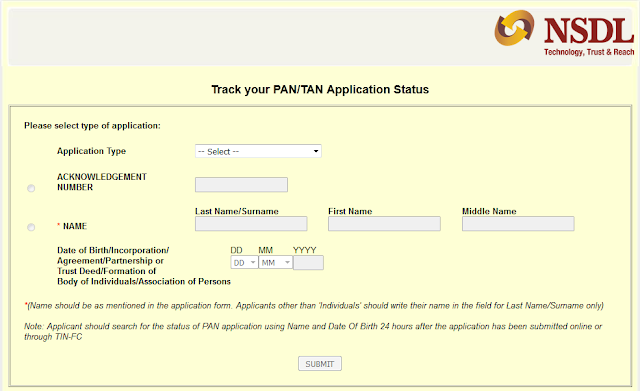
Check online status of your Permanent Account Number (PAN) or Tax Deduction Account Number (TAN) application submitted to Income Tax Department. Users can track status of their application by selecting the application type, acknowledgement number, name and date of birth of the applicant. The Process is given below.
  • If you Applied for pan Card at NSDL you need to go to this link https://tin.tin.nsdl.com/pantan/StatusTrack.html . 
    First choose your Application type. If You have acknowledgement Number , Choose Acknowledgement Number And Enter it. If you don,t have Acknowledgement Number , You have to choose Name. Enter Your Name and date of birth and click Submit. 
     pan card status


    To Know The status Of your Pan Click here   

     If You applied for Pan Card at UTI You need to go to this link http://www.myutiitsl.com/PAN_ONLINE/trackApp  to Check pan status online.
    To Check the status of your pan Select your Application Type.
    Enter your Application Number or Coupon Number And click Submit
    http://aadhaarcorrection.blogspot.in/2015/11/how-to-check-pan-card-status_2.html

    To Know the Status of your Pan  Click here

How to Check Pan Card Status?

Check online status of your Permanent Account Number (PAN) or Tax Deduction Account Number (TAN) application submitted to Income Tax Department. Users can track status of their application by selecting the application type, acknowledgement number, name and date of birth of the applicant. The Process is given below.

  • If you Applied for pan Card at NSDL you need to go to this link https://tin.tin.nsdl.com/pantan/StatusTrack.html . First choose your Application type. If You have acknowledgement Number , Choose Acknowledgement Number And Enter it. If you don,t have Acknowledgement Number , You have to choose Name. Enter Your Name and Date of birth and click Submit.

    To Know The status Of your Pan Click here 

Update Mobile Number in Aadhaar Online

If you want to change your mobile number in Aadhaar You can change it via online.To Update Mobile Number in Aadhaar card online you need to go to the Official website of UIDAI. If your mobile number is register with UIDAI ,you can Update your Aadhaar Data online From Aadhaar Self Service Portal of UIDAI.You Can Change Name, Gender, Date of Birth, Father's Name, Address And Mobile Number . To Update (Change) your Mobile Number in Aadhaar Online Follow these steps-
  • First Go to the official website http://uidai.gov.in/ And Select Update Aadhaar Data
  • You can go direct on that page followed by this URL https://resident.uidai.net.in/update-data
  • There are two method to Update mobile number in Aadhaar  Online and Offline.
  • To Update Mobile Number online You need to click on Update Aadhaar Data 
  • After Click on it Aadhaar Self Service Portal is open.
  • Click on Submit Update/Correction Online
  •  The New window will be open as below image
http://aadhaarcorrection.blogspot.in/2015/10/how-to-register-mobile-in-aadhaar-online.html
  •   Enter Your Aadhaar Number And Verification Text ,
  •  Click on Send OTP. 
  • If Your Mobile number is register in aadhaar then you will receive OTP(One Time Password) On your Register mobile Number.
  • If Your Mobile Number is not Register in Aadhaar Click Here To Register
http://aadhaarcorrection.blogspot.in/2015/10/how-to-register-mobile-in-aadhaar-online.html
  • Enter OTP and Click On Login Button
  • Select Field Mobile Number (Check this field) and click submit
  • Next write Your mobile Number and finely submit the Request .
  • You will be get a SMS with   URN(Update Request Number) you Can check update status with Aadhaar number and URN through  url https://ssup.uidai.gov.in/web/guest/check-status
Watch this Video How to Register Mobile Number In Aadhaar Onilne Click Here
http://www.androidcreator.com/app95029